Lesson
Use Case 1: Segment Reporting
Challenge to solve: How to report Braze statistics to users outside of Braze.
In this example use case, we'll explore how you can report key data to stakeholders using the following elements:
- Braze as a messaging engine
- Braze REST API endpoints
- Connected Content
- Liquid
- External APIs
Use Case Outcome
By the end of this use case, you'll be able to produce an email that displays segment growth over time.
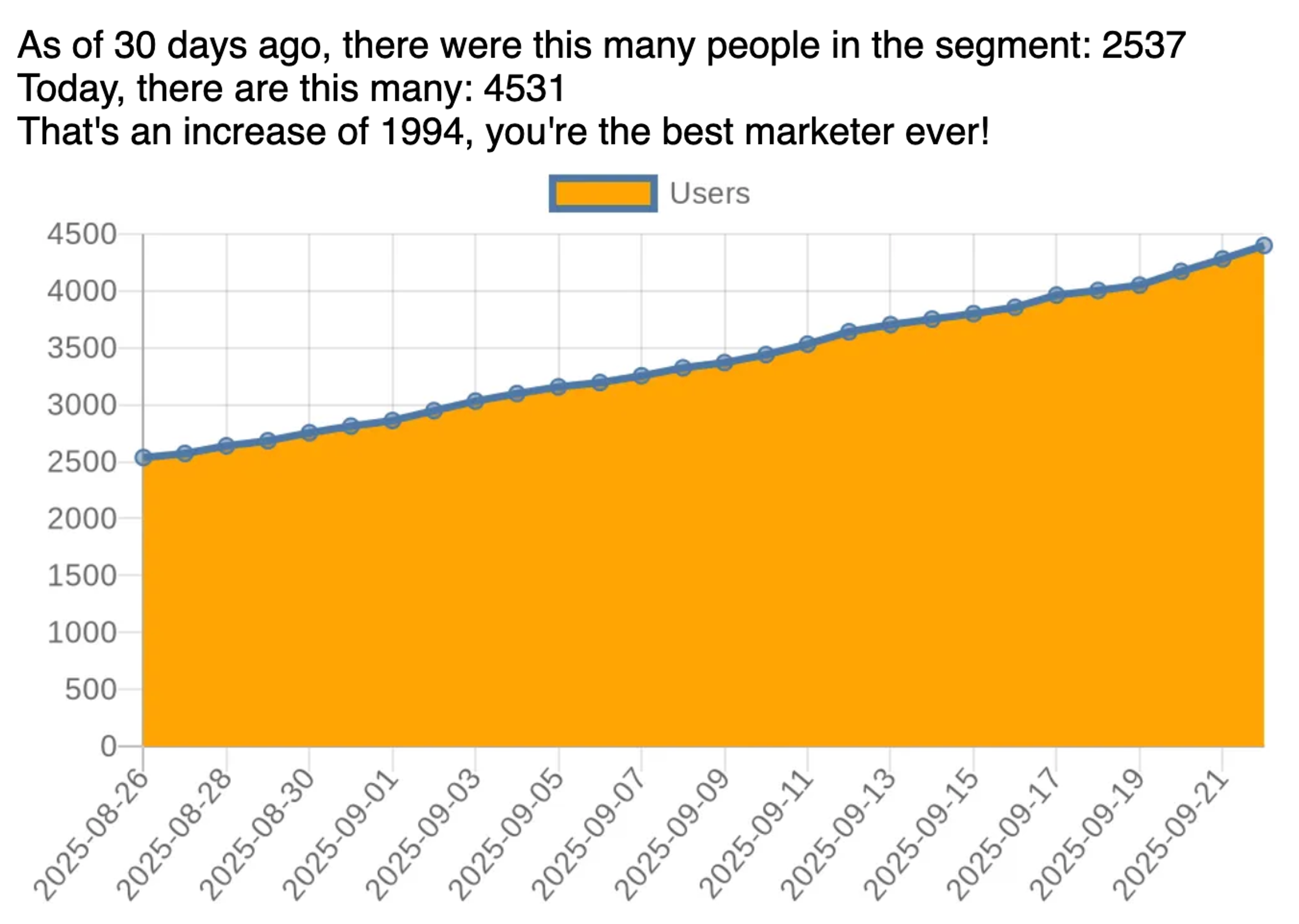
Email Structure
In this section we'll break down the email piece-by-piece. The complete email is shown at the end of the section.
Setup
The email begins by setting up key variables, such as how many days of data we want to download.
1<!-------------Lookback Length Controls Statistics-------------------!>
2{% assign lookback_length = 30 %}
3
4<!-------------Cut and Paste Your Segment ID-------------------!>
5{% assign segment_id = "1234567" %}
Connected Content -> Braze APIs
After this, the email makes a Connected Content call to the segments/data_series endpoint. This data export endpoint expects the segment identifier, which can be found in the Braze dashboard, and the number of days worth of data to return. We pass these values directly into the URL in the request.
7<!-------------Connected Content Call Start--------------------------!>
8{% connected_content
9     https://rest.iad-06.braze.com/segments/data_series?segment_id={{segment_id}}&length={{lookback_length}}
10     :method get
11     :headers {
12       "Content-type" : "application/json",
13       "Authorization" : "Bearer 1234-5678" <!--Add correct authorization code from Braze Dashboard --!>
14     }
15     :save response
16%}
17<!-------------Connected Content Call End--------------------------!>
The Connected Content request returns an object with two items: a status message called message, and an array titled data. Each individual item in the data array is a dictionary containing a "time" and a "size" value.
{"time"=>"2025-08-26", "size"=>2537.0}{"time"=>"2025-08-27", "size"=>2573.0}{"time"=>"2025-08-28", "size"=>2640.0}Array Data
The Connected Content call requests data through to the current date by default. In our demonstration dashboard, it turns out that the data from the last two days is empty. You'll see that we have to remove those last two days of values in various places in the code.
19<!-- Last two days segment size is always 0 in our dashboard's fake data, must remove -->
20
21{% assign last_array_item = lookback_length | minus: 2 %}
22{% assign response_data_trunc = response.data | slice: 0, last_array_item %}
Reporting Statistics
We want a prose description of the statistics in our email. We use a combination of plain text and Liquid to display this information. We can do some simple math to calculate how the segment has grown over time and display that value.
24<!-------------Reporting Summary Statistics--------------------------!>
25As of {{lookback_length}} days ago, there were this many people in the segment:
26{% assign start_size = response.data[0].size %}
27{{start_size | round}}
28<br>
29Today, there are this many:
30{% assign latest = response.data[last_array_item].size %}
31{{latest | round }}
32<br>
33That's an increase of {{latest | minus: start_size | round}}, you're the best marketer ever!
34<br>
35<!-------------Reporting Summary Ends--------------------------!>
Visualizing Data
To visualize our data, we can use Quickchart.io. You can send graph data to this site, and it returns an image with the rendered data.
37<!-------------Graph Creation--------------------------!>
38
39        <!-------------Format Data for URL--------------------------!>
40{% assign data_labels = response_data_trunc | map: "time" | join: "\', \' " | prepend: "'" | replace: "\", "" | append: "'"%}
41{% assign data_series = response_data_trunc | map: "size" | join: ", " %}
42
43        <!-------------Request Rendered Graph--------------------------!>
44<img width="600px" src="https://quickchart.io/chart?bkg=white&c={ type: 'line', data: { labels: [{{data_labels}}], datasets: [ { label: 'Users', backgroundColor: 'orange',  data: [{{data_series}}] }] }}"
First we have to prepare the data so it appears the way the website expects. The labels query string must have a series of labels formatted as "date", "date". The data query string only needs to have the numerical values, with no quotations. We're able to use a combination of the map and join filters to produce these string.
We also have to do some additional processing to get Liquid to properly add the quotations marks to the labels string.
After that, we can simply place the Quickcharts URL in an <img> tag and it renders dynamically according to the data we shared with it.
Complete Email
1<!-------------Lookback Length Controls Statistics-------------------!>
2{% assign lookback_length = 30 %}
3
4<!-------------Cut and Paste Your Segment ID-------------------!>
5{% assign segment_id = "2e8c74dc-5ac1-4647-9f9e-d002da272b97" %}
6
7<!-------------Connected Content Call Start--------------------------!>
8{% connected_content
9     https://rest.iad-06.braze.com/segments/data_series?segment_id={{segment_id}}&length={{lookback_length}}
10     :method get
11     :headers {
12       "Content-type" : "application/json",
13       "Authorization" : "Bearer 1234-5678" <!--Add correct authorization code from Braze Dashboard --!>
14     }
15     :save response
16%}
17<!-------------Connected Content Call End--------------------------!>
18
19<!-- Last two days segment size is always 0 in our dashboard's fake data, must remove -->
20
21{% assign last_array_item = lookback_length | minus: 2 %}
22{% assign response_data_trunc = response.data | slice: 0, last_array_item %}
23
24<!-------------Reporting Summary Statistics--------------------------!>
25As of {{lookback_length}} days ago, there were this many people in the segment:
26{% assign start_size = response.data[0].size %}
27{{start_size | round}}
28<br>
29Today, there are this many:
30{% assign latest = response.data[last_array_item].size %}
31{{latest | round }}
32<br>
33That's an increase of {{latest | minus: start_size | round}}, you're the best marketer ever!
34<br>
35<!-------------Reporting Summary Ends--------------------------!>
36
37<!-------------Graph Creation--------------------------!>
38
39        <!-------------Format Data for URL--------------------------!>
40{% assign data_labels = response_data_trunc | map: "time" | join: "\', \' " | prepend: "'" | replace: "\", "" | append: "'"%}
41{% assign data_series = response_data_trunc | map: "size" | join: ", " %}
42
43        <!-------------Request Rendered Graph--------------------------!>
44<img width="600px" src="https://quickchart.io/chart?bkg=white&c={ type: 'line', data: { labels: [{{data_labels}}], datasets: [ { label: 'Users', backgroundColor: 'orange',  data: [{{data_series}}] }] }}"
Extending Further
To make this whole code block more extensible, you can remove the assignments for key variables from the code, and then move the entire code block into a Content Block to easily create dashboards in your emails.
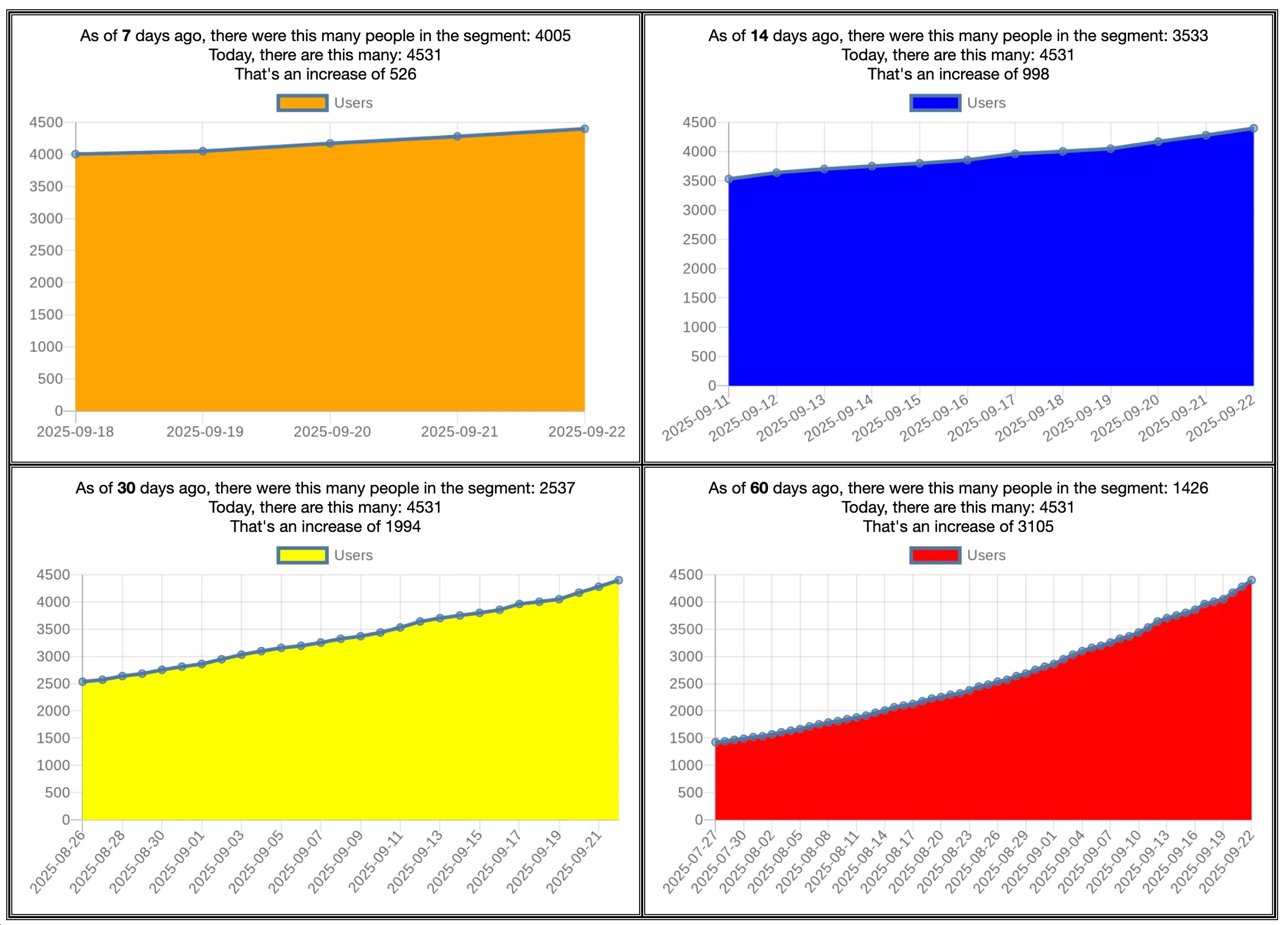
Each cell of this table overrides the values of the variables that are referenced in the Content Block. Then the final line of the Liquid imports the Content Block.
<table>
        <tr>
            <td>
{% assign segment_id = "1234567"%} <!--include your correct segment_id here --!>
{% assign chart_color = "orange" %}
{% assign lookback_length = 7 %}
{{content_blocks.${SegmentsChart_Forge25} | id: 'cb1'}}
</td>